Last updated: July 28, 2026 — tested on Claude Code v2.1.218, Windows 11, Claude Max subscription.
You open your terminal in the morning, type a prompt, and Claude Code answers with Not logged in · Please run /login — again. Third time this week. Nothing you did caused it, and logging back in fixes it until it doesn’t. This post explains the actual mechanism behind the repeated logouts (it’s an 8-hour token with a fragile refresh), which versions fixed which parts of it, and a ranked repair list — everything verified on my own Windows 11 machine this week.
Where your login actually lives on Windows
First, a myth to kill: Claude Code does not use Windows Credential Manager. Your login is a plain JSON file:
C:\Users\<you>\.claude\.credentials.jsonIt holds three things: a short-lived access token, a long-lived refresh token, and an expiry timestamp. You can check the expiry on your own machine without exposing any secrets — this decodes just the timestamp:
[DateTimeOffset]::FromUnixTimeMilliseconds((Get-Content "$env:USERPROFILE\.claude\.credentials.json" | ConvertFrom-Json).claudeAiOauth.expiresAt).LocalDateTime
I ran this on a freshly used session and got an expiry about eight hours out. That is the core fact of this whole article: your access token dies roughly every 8 hours, by design. Normally you never notice, because Claude Code silently trades the refresh token for a new one. Every “keeps logging out” story is some version of that silent refresh failing.
(Warning if you go poking at this file: don’t print its full contents to your screen or paste it anywhere — the tokens inside are your login. And never copy the file to another machine as a “backup login”; that’s one of the documented ways to break your auth.)
Why it keeps happening
The sleep/wake bug — fixed in 2.1.211. This was the big one. Before v2.1.211, waking your PC from sleep could make two Claude Code sessions try to renew with the same single-use refresh token. The loser of that race didn’t just fail — it revoked the saved login, and every open session demanded /login at once. If your logouts date from before that version, this was probably your culprit, and the fix is simply being current. Anthropic also shipped a chain of quality-of-life fixes around it: a proper “Login expired” error instead of a confusing model error (2.1.206), a Login row in /status (2.1.210), and an expiry warning a few days ahead (2.1.203, tightened in 2.1.217).
The morning-logout bug — still open. A cluster of GitHub issues (#68398, #72017) describes exactly the same picture on Windows: the 8-hour token expires overnight and the refresh never happens, so every morning starts with /login. No fix is confirmed in the changelog yet. If this is you, the repair list below won’t cure it permanently — but it makes each occurrence a 60-second annoyance instead of a mystery.
Something else is eating your refresh token. The refresh token is single-use. If any other tool reads and refreshes your Claude Code credentials — usage-tracker menu bar apps, community dashboards, a second machine you copied the file to — it rotates the token out from under Claude Code, and you get logged out “randomly.” One popular status-bar tool had exactly this bug filed against it.
A stale environment credential is overriding your login. This is the classic login loop: /login succeeds, and the errors continue anyway. Claude Code checks environment credentials before your OAuth login — ANTHROPIC_API_KEY, ANTHROPIC_AUTH_TOKEN, CLAUDE_CODE_OAUTH_TOKEN. If an old or dead key is set in one of those, it wins, and no amount of logging in fixes it. Hunt them down:
Get-ChildItem Env: | Where-Object { $_.Name -like 'ANTHROPIC*' -or $_.Name -like 'CLAUDE*' }If anything shows up that you don’t recognize, remove it (example for a user-level API key):
[Environment]::SetEnvironmentVariable('ANTHROPIC_API_KEY', $null, 'User')Smaller suspects, quickly: WSL and native Windows keep separate credential files, so switching between them feels like being logged out (it isn’t — they’re two different logins). A wrong system clock breaks token validation (w32tm /resync from an admin terminal). Corporate proxies can 403 you after a successful login. And org-managed accounts can be logged out server-side by an admin — no local fix exists for that one.
The repair list, in order
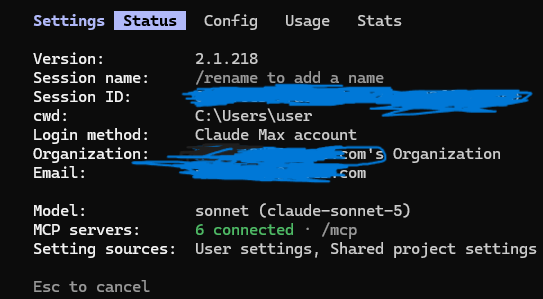
claude update— most of the logout mechanics were fixed between 2.1.206 and 2.1.211. Check withclaude --version; I’m on 2.1.218. (If version surprises are a recurring theme for you, I watch releases automatically with n8n.)/statusbefore touching anything. On a healthy login it showsLogin method: Claude Max account(screenshot below); when your login has actually expired, that row changes to tell you so (added in 2.1.210). If you instead see an API key listed, go back to the environment-variable hunt above — that’s your problem.
/login— renews in place, no logout needed. Works for most expiry cases.- The clean cycle:
/logout→ close the terminal completely →claude→ log in. This resets the stored credentials and first-run state. The whole round trip takes about a minute, so don’t be afraid of it as a troubleshooting step. - Last resort — delete the credentials file and log in fresh:
Remove-Item "$env:USERPROFILE\.claude\.credentials.json"This only removes auth — your chat history and settings survive. Don’t delete the whole .claude folder; people have lost session history that way.
- Still broken? Check status.anthropic.com (there have been server-side login incidents), and if you’re on a company org, ask your admin whether subscription access or your session was revoked.
“OAuth error: Invalid code” — the login that won’t complete
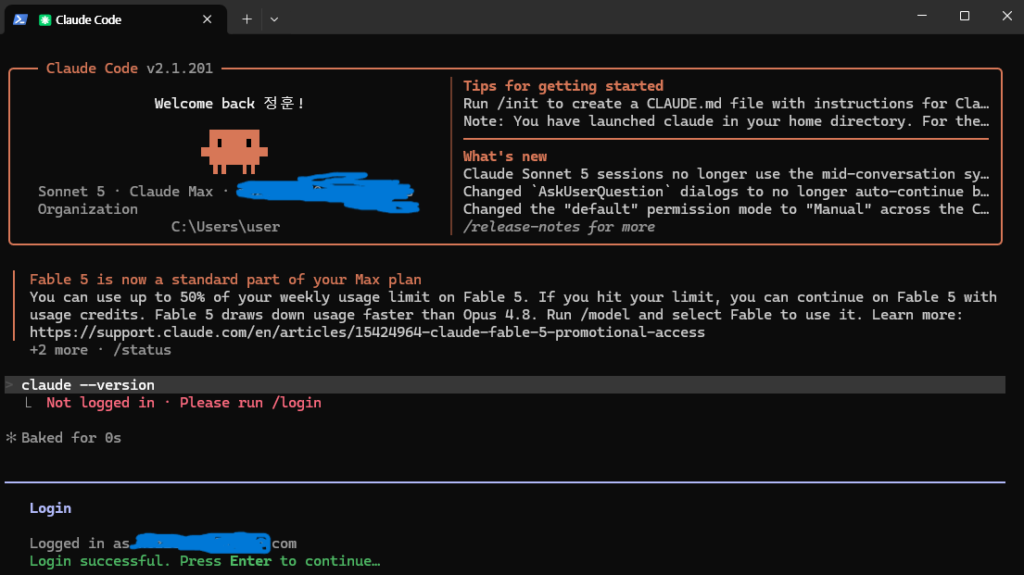
Half of “keeps logging out” frustration is that logging back in fails. I hit this myself:
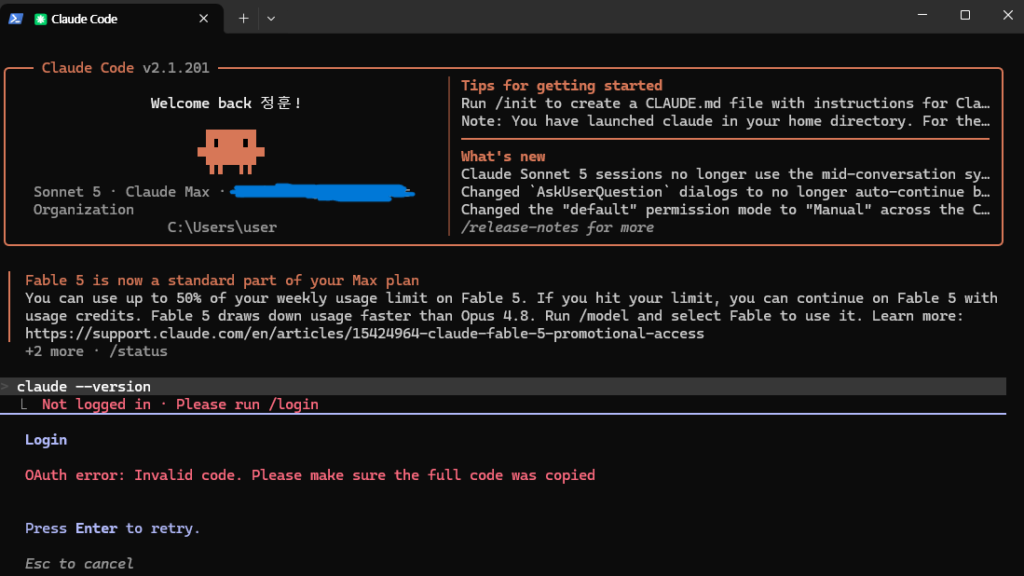
The error means the code you pasted was truncated or expired. The clean walkthrough:
- Run
/login. If the browser doesn’t open, Claude Code shows the URL with “c to copy” — pressc, paste it into your browser yourself:
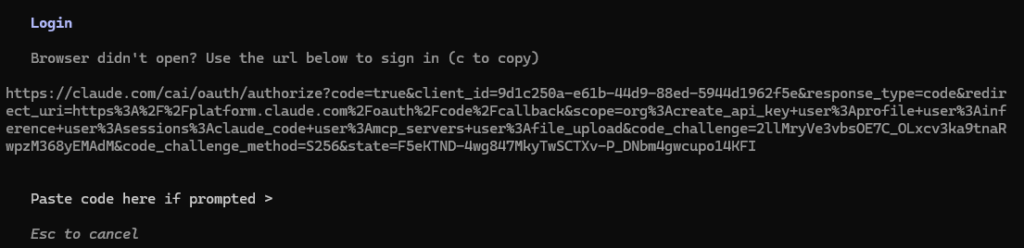
- Sign in, then copy the code from the success page with the copy button, not by drag-selecting — drag selection is how codes get truncated.
- Back in the terminal, paste with a right-click (Windows Terminal’s paste), then Enter.
- If it fails, press Enter to retry and use a fresh code — an expired code will never work no matter how correctly you paste it.
Three myths, quickly
“It’s in Windows Credential Manager.” No — plain JSON file, path above. Fixing Credential Manager entries does nothing.
“Logging in on my laptop logged out my desktop.” Fresh logins mint separate tokens; machine B doesn’t kill machine A. Cross-machine logouts trace back to copied credential files or third-party tools sharing one refresh token.
“OneDrive is syncing my login away.” The .claude folder sits in your profile root, which OneDrive doesn’t sync by default. Worth checking only if you’ve set CLAUDE_CONFIG_DIR to a synced location.
FAQ
Is the 8-hour expiry itself a bug? No — short-lived access tokens are standard security design. The refresh is supposed to be invisible. It becoming visible (daily /login) is the bug.
I need Claude Code in scripts/CI without interactive login. claude setup-token issues a 1-year token (Pro/Max and up). One trap: once set as CLAUDE_CODE_OAUTH_TOKEN, it outranks /login forever — so when it eventually expires, that machine breaks in a way /login can’t fix until you remove the variable. Note the date somewhere.
Does this affect the VS Code extension too? The credential store is shared, but the extension has its own login-loop bug reports. This guide is CLI-tested; verify separately before assuming parity.
How often should I expect to log in normally? On a healthy install: rarely — the refresh token keeps you signed in for a long time. If you’re re-authenticating daily, something on this page is happening to you.
More Claude Code problems, organized by symptom, live in my troubleshooting hub.
WorkflowDen is an independent site, not affiliated with or endorsed by Anthropic, PBC.