Two Discord messages, two hours apart.
The first landed at 10:00 AM on July 10 (KST), minutes after my PC booted:
[ERROR] release-watcher failed — The resource you are requesting could not be found

The second arrived at noon:
claude-code 2.1.206 released — followed by the full changelog, pulled straight from the release notes.
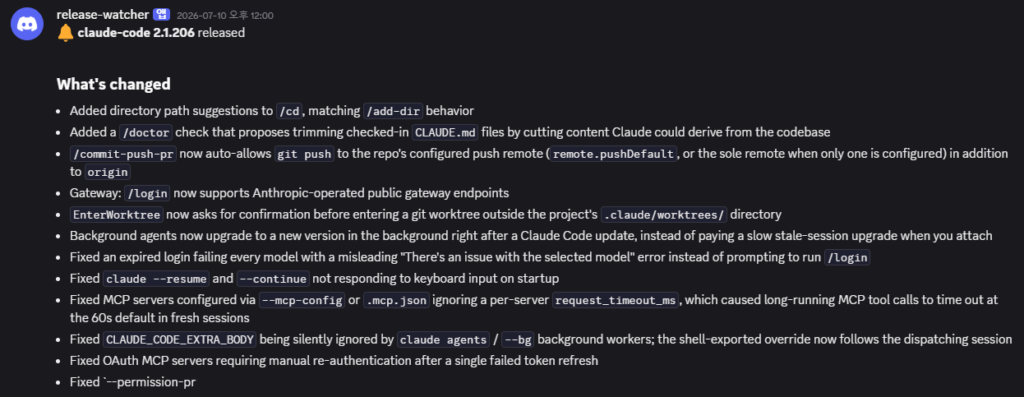
I’d deployed this workflow the evening before. First morning in production, and it didn’t just catch a release. It caught Anthropic quietly rolling one back. Here’s what I built, what the two alerts actually meant, and why the error turned out to be the more interesting message.
Why I poll npm instead of the GitHub API
Before building anything, I ran some research comparing sources for version data, because I update two tools obsessively: Claude Code itself and my self-hosted n8n. Two findings shaped the whole design.
Trap one: GitHub Releases lag npm. For Claude Code, the npm registry updates roughly two hours before the corresponding GitHub Release shows up. When I checked while writing this post, the repo’s CHANGELOG.md was still sitting behind what npm’s latest tag pointed to. If you poll GitHub, you’re always the last to know.
Trap two: /releases/latest doesn’t mean what you think. When I tested the GitHub API for n8n, /releases/latest handed me a rolling “stable” tag rather than a clean version number I could diff against stored state. The npm registry, by contrast, gives you exactly what you want in one GET: registry.npmjs.org/n8n/stable returns the current stable release as plain JSON, and registry.npmjs.org/@anthropic-ai/claude-code/latest does the same for Claude Code.
So the rule I settled on: npm is the source of truth for “what version exists”; GitHub is only for the human-readable release notes. That split matters later in this story.
The build: eight nodes, one state table
The whole thing runs on my self-hosted n8n in Docker on a Windows machine. The chain:
- Schedule Trigger: fires every 2 hours.
- HTTP Request (x2): GET the two npm registry endpoints above.
- Code node: normalizes both responses into
{ package, version }items. - Data Table lookup: reads the last-seen version for each package from a
release_statetable. - Diff: no change, stop quietly; change, keep going.
- HTTP Request: fetch the matching GitHub release notes for the new version.
- Discord webhook: post the version bump plus changelog.
- Data Table upsert: write the new version back as last-seen state.


A separate global error workflow (Error Trigger into a Discord webhook) catches anything that throws, in this workflow or any other. I almost skipped that part because it felt like ceremony for a toy watcher. It ended up being the hero of the first morning.
The morning of July 10: a rollback, timestamped
Here’s the timeline my watcher recorded, all times KST:
| Time (KST) | What the watcher saw | What it did |
|---|---|---|
| Jul 9, ~11 PM | npm latest = 2.1.205 | Stored as last-seen state (first run) |
| Overnight | Nothing — my PC was off | n8n doesn’t backfill missed schedules; a missed run becomes a delay, not a loss |
| Jul 10, 10:00 AM | npm latest = 2.1.152 | Diff detected, but the GitHub notes fetch 404’d → error workflow fired |
| Jul 10, 12:00 PM | npm latest = 2.1.206 | Notes fetch succeeded → clean changelog alert |
When I read the 10 AM error over coffee, my first assumption was that I’d shipped a bug. New workflow, first morning, of course it broke. So I opened the execution log expecting a typo in my URL template.
Instead, the versions made no sense. The previous evening npm’s latest was 2.1.205. Now it was 2.1.152 — a lower number, and per the npm registry’s own timestamps, a version originally published back in late May. The dist-tag hadn’t advanced; it had been moved backward. My workflow then tried to fetch GitHub release notes for that state, the tag it constructed didn’t match anything, and GitHub returned 404. The workflow failed exactly as designed, and the error workflow told me about it.
That 404 wasn’t a bug. It was the signature of a rollback.
What I think happened (hedged appropriately)
I don’t have any inside information, so this is pattern-reading, not reporting. My best guess:
- 2.1.205 had a problem. It was published July 8 (UTC), became
latest, and something about it warranted pulling it. latestgot parked on a known-good version. Rather than leave a bad build as the default install, someone repointed the dist-tag to 2.1.152, which had been stable in the wild since May. Repointing a dist-tag is instant; publishing a fix takes longer.- 2.1.206 shipped the fix. The npm registry shows it was published late July 9 UTC, and by my noon poll,
latestpointed at it with matching release notes on GitHub.
It looks like a textbook safe-rollback playbook. Anyone running npm install -g @anthropic-ai/claude-code during that window would have silently received a two-month-old version, and I haven’t seen this documented anywhere else — no changelog entry, no status page note. Which is fair. Dist-tag moves are invisible unless something is watching. Mine was.
I logged the incident in my Claude Code version errors fix log, which is where future ones will land too.
The uncomfortable takeaway about auto-updating
I used to treat latest as a monotonic counter: it only goes up, so “newer install = newer version.” This morning broke that assumption. latest is a mutable pointer, and vendors will move it backward when they need to. Arguably that’s the responsible thing to do.
For a dev tool on my laptop, that’s fine. For anything in CI or a Dockerfile, it means an unpinned install can hand you a different version than yesterday, in either direction. I’m now rethinking how I pin both Claude Code and n8n versions across my setup, and that’s turning into its own post.
The other takeaway: build the error workflow first. My watcher’s happy path caught one release that morning. The error path caught the actual story.
Grab the workflow
The exact workflow is below as an importable JSON — Schedule Trigger, both npm registry calls, the normalize Code node, Data Table lookup/upsert, the diff, GitHub notes fetch, and the Discord webhook. Swap in your own Discord webhook credential, create a release_state Data Table with pkg and last_ver columns, and publish it. Don’t forget to set a global error workflow under workflow settings; that part isn’t optional anymore, as far as I’m concerned.
If it catches something weird on your first morning too, I’d genuinely love to hear about it.
Independent site — I pay for my own subscriptions and no vendor reviews my drafts. The alerts, timestamps, and workflow above are from my own machine, unedited.