
Last updated: July 14, 2026 — tested on Windows 11. New incidents get added as they happen.
Claude Code ships new versions almost daily, and the failure mode is always the same shape: the binary on disk, the session in memory, and the preset list baked into the release all disagree about what “current” means. A model goes missing from the picker, claude update insists you’re up to date while your banner says otherwise, or — as happened overnight on July 9 — the version you’re running quietly travels backwards. This page is a living log of those incidents. I run Claude Code daily on Windows 11, every entry below happened on my machine, and I add new incidents as they occur. Bookmark it; the next one is coming.
TL;DR: Update to Claude Code v2.1.197 or later (claude update), then restart your terminal — an already-open session keeps running the old version even after updating. If the picker labels it “custom model” on some versions, /model claude-sonnet-5 works anyway.
Why Sonnet 5 isn’t showing up
Three causes, in order of likelihood:
- Your CLI is older than v2.1.197. Sonnet 5 support shipped in 2.1.197 on June 30. Mine was 2.1.179 — close, but not enough.
- You updated but didn’t restart the terminal. The running session keeps the old binary in memory (more on this below — it’s sneaky).
- You’re on 2.1.197+ but hit the “custom model” labeling bug (issue #72692) — the CLI accepts Sonnet 5 but doesn’t display it as a named preset.
Step 1: Check what you’re actually running
claude --version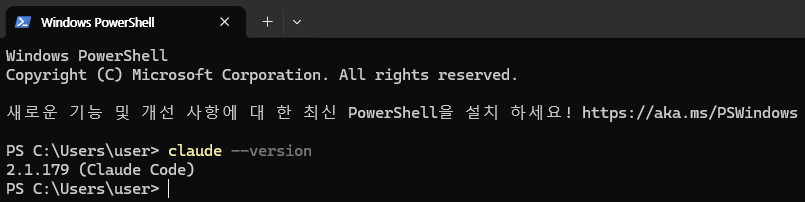
Anything below 2.1.197 can’t show Sonnet 5. Here’s what my /model picker looked like on 2.1.179 — Opus 4.8, Fable 5, Sonnet 4.6, Sonnet 4.6 (1M), Haiku 4.5. No Sonnet 5 anywhere:
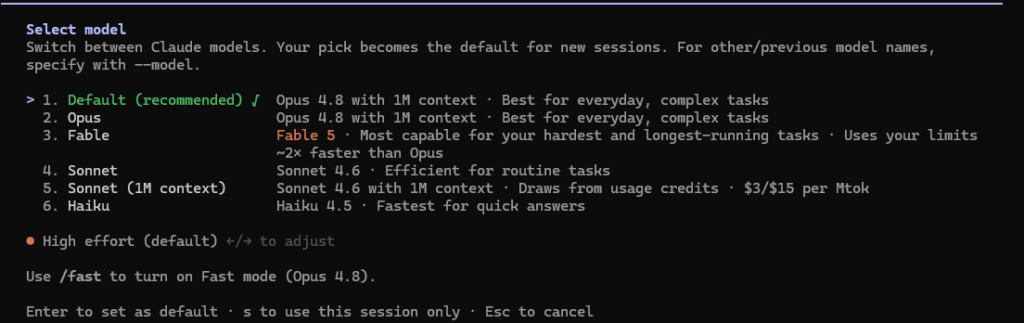
Version Incident Log
July 16, 2026 — claude-sonnet-5 is temporarily unavailable. Different beast from the entries below: this one wasn’t a version problem. Anthropic’s status page logged elevated errors on Sonnet 5 requests for about 15 minutes that morning — a service-side blip, not your install. The tell: version errors persist until you act; capacity errors fix themselves. If you see this message, check status.claude.com first, wait a few minutes, and only start debugging your setup if it lasts beyond that.
July 9–10, 2026 — the overnight rollback (2.1.205 → 2.1.152 → 2.1.206). My release-watcher caught this one before I did: Anthropic pulled 2.1.205 and republished latest as 2.1.152 overnight, then shipped 2.1.206 the next morning. If you updated during that window, you didn’t imagine it — your version genuinely went down, and features from the 2.1.19x line (including the Sonnet 5 preset) vanished with it. The fix was simply updating again once 2.1.206 landed, but the lesson is bigger: “latest” is not monotonic. If a feature disappears after an update, check whether the version number itself moved backwards before you debug anything else.
July 4, 2026 — the stale-session trap (2.1.179 → 2.1.201). This is the incident that started this log. claude update reported “Claude Code is up to date (2.1.201)” while my session banner said v2.1.179 — and both were true. The native installer had already auto-updated the binary on disk in the background, but my open terminal was still running the old version from memory. The fix is stupidly simple: close the terminal completely and open a new one. The full walkthrough, with the original screenshots, follows below.
Step 2: Update — and don’t fall for the trap I fell for
Run:
claude updateHere’s where it got interesting. My update said:
Current version: 2.1.201 — Claude Code is up to date (2.1.201)
…while my session banner clearly said v2.1.179. Both were true. The native installer had already auto-updated the binary on disk in the background — but my open terminal was still running the old version from memory.
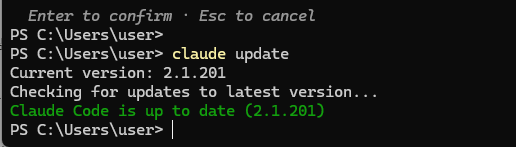
The fix is stupidly simple: close the terminal completely and open a new one.
claude --version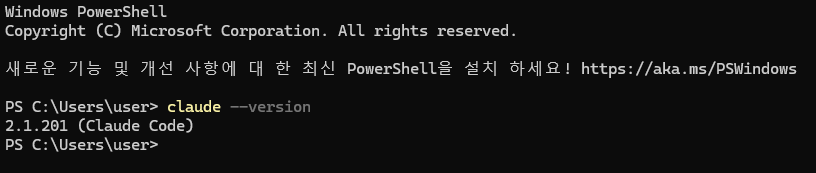
If a new terminal still shows the old version, you likely have two copies installed (npm + native). Run where.exe claude (Windows) or which claude (macOS/Linux) and remove the stale one — the native install lives at ~/.local/bin/claude.
Update commands for other install methods:
- npm:
npm install -g @anthropic-ai/claude-code@latest(notnpm update -g— the docs warn it may not move you to newest) - Homebrew:
brew upgrade claude-code(stable cask runs ~a week behind) - winget:
winget upgrade Anthropic.ClaudeCode
Also check nothing is pinning you back: the DISABLE_AUTOUPDATER env var or "autoUpdatesChannel": "stable" in settings will keep you behind.
Step 3: Confirm Sonnet 5 is there
Start a new session and type /model. On 2.1.201, here’s the updated picker:
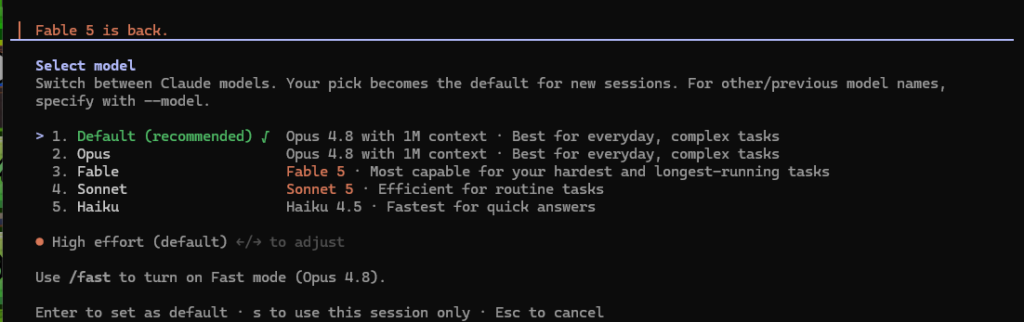
Two things worth noticing in the new list:
- Sonnet now means Sonnet 5 (“Efficient for routine tasks”).
- The separate “Sonnet (1M context)” entry is gone. That’s not a bug — Sonnet 5’s 1M-token context window is native. There’s no 200K variant, no
[1m]suffix to select, and no usage credits required on any plan. The old 4.6-era distinction just stopped existing.
Select it and you’ll get the confirmation:
Set model to Sonnet 5 and saved as your default for new sessions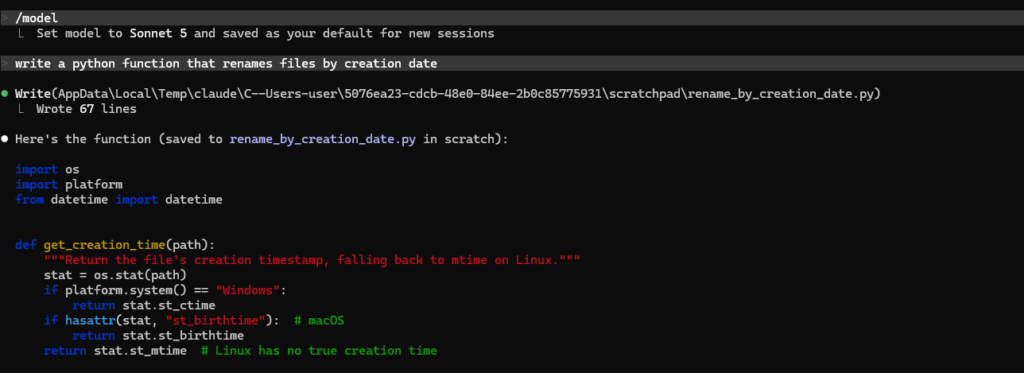
Still seeing “custom model” instead of a named preset?
On some builds (reported on 2.1.185, issue #72692, still open), the CLI accepts Sonnet 5 but the picker displays it as “custom model” instead of a named entry — while the VS Code extension shows it properly. It’s cosmetic. The workaround from the issue thread:
/model claude-sonnet-5The CLI confirms with “Kept model as claude-sonnet-5” and you’re running Sonnet 5 regardless of the label. The same pattern happened at Opus 4.8’s launch (#63456) — the CLI’s preset list ships inside the binary, so it can lag model launches.
Set it permanently
Four ways, in order of precedence:
Launch flag (one session):
claude --model claude-sonnet-5Environment variable:
export ANTHROPIC_MODEL=claude-sonnet-5settings.json (persistent):
{
  "model": "claude-sonnet-5"
}
Or just the /model picker — since v2.1.153, pressing Enter saves your choice as the default for new sessions (‘s’ keeps it session-only).
The exact model ID is claude-sonnet-5 — no date suffix. Aliases sonnet-5 and plain sonnet also resolve to it. One caveat: if your organization enforces a default model, it can override your personal settings — you’ll see “Org default” in the picker.
Does Sonnet 5 burn your limits differently?
It’s cheaper per token than Opus 4.8 — $2/$10 per million tokens promotional through August 31, 2026, then $3/$15 — and it’s the subscription default, which makes it the cheap path. The Max-plan bug where Sonnet usage drains both weekly pools is covered in the usage limits guide.
For the full picture of Claude Code’s 5-hour and weekly limits — including the July 19 weekly-limit expiry — see our Claude Code usage limits guide.
FAQ
Is Sonnet 5 the default now? Yes — v2.1.197 made it the default in Claude Code. If you’d pinned a different model in settings.json, your pin wins.
Sonnet 5 shows in the picker but I can’t select it. Update anyway — early reports noted it being visible but unusable until 2.1.197+.
Do I need to enable the 1M context window? No. It’s native and always on for Sonnet 5, on every plan.
Does /model sonnet-5 work too? Yes — it’s an official alias for claude-sonnet-5.
WorkflowDen is an independent site, not affiliated with or endorsed by Anthropic, PBC. Every step in this post was run on my own machine — version numbers are visible in the screenshots.