Every n8n workflow works great until the API on the other end has a bad day. Then your Monday starts with a red execution list and a Slack full of “why didn’t the invoices sync?”
I spent a weekend building the seven error handling patterns I actually use, on a fresh n8n 2.29.9 instance (local Docker, Windows), and exported every one of them. Here’s the map before we get into the clicks:
| # | Pattern | Use it when |
|---|---|---|
| 1 | Retry On Fail | Flaky APIs, transient network blips |
| 2 | Error branch | One node’s failure needs its own path |
| 3 | Global error workflow | You want one alert channel for every workflow |
| 4 | Error classification | Different status codes need different reactions |
| 5 | Exponential backoff loop | Rate limits, or retries that need to slow down |
| 6 | Idempotency check | Reruns must never process the same item twice |
| 7 | Dead-letter queue | Failed items should be stored and retried later |
Tested on n8n 2.29.9, July 2026. All eight JSONs (seven patterns plus the dead-letter retry companion) are at the bottom.
1. Retry On Fail: the two-click fix
This solves the most common failure of all: an API that works on the second try.
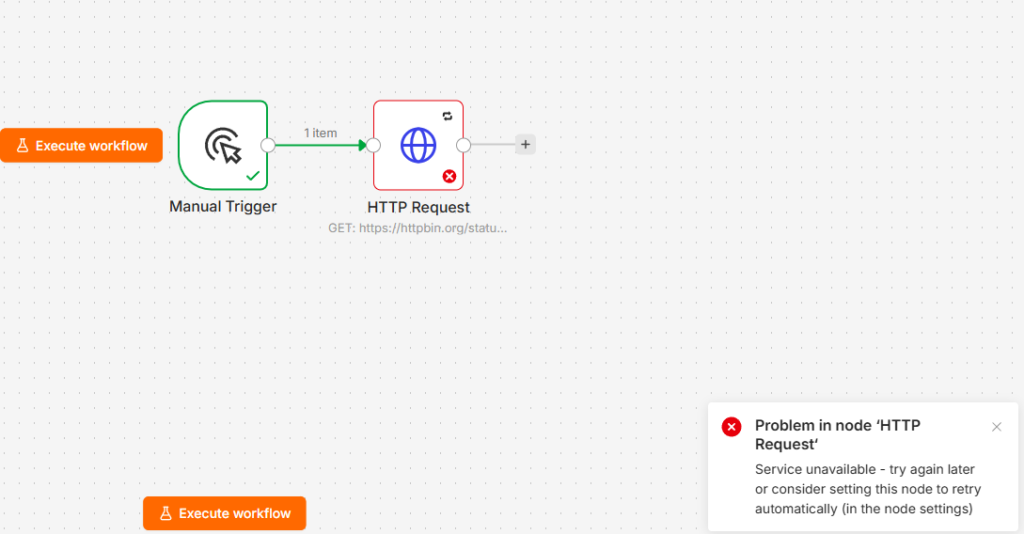
Open any node, go to Settings, flip on Retry On Fail, and set Max Tries (I use 3) and Wait Between Tries (I use 5000 ms). That’s it. n8n retries the node silently and only fails the execution when all attempts are exhausted.
I tested it against httpbin.org/status/503 to force failures. The gotcha came when I switched the URL to httpbin.org/get for the success screenshot: httpbin itself was returning 503s. The test API was genuinely down, which accidentally proved the whole point of this article live. I moved my success demos to jsonplaceholder.typicode.com and they’ve been solid since.
2. Error branch: give the node a second output
Retries handle transient failures. An error branch handles the case where you want the workflow to keep going and do something specific with the failure.
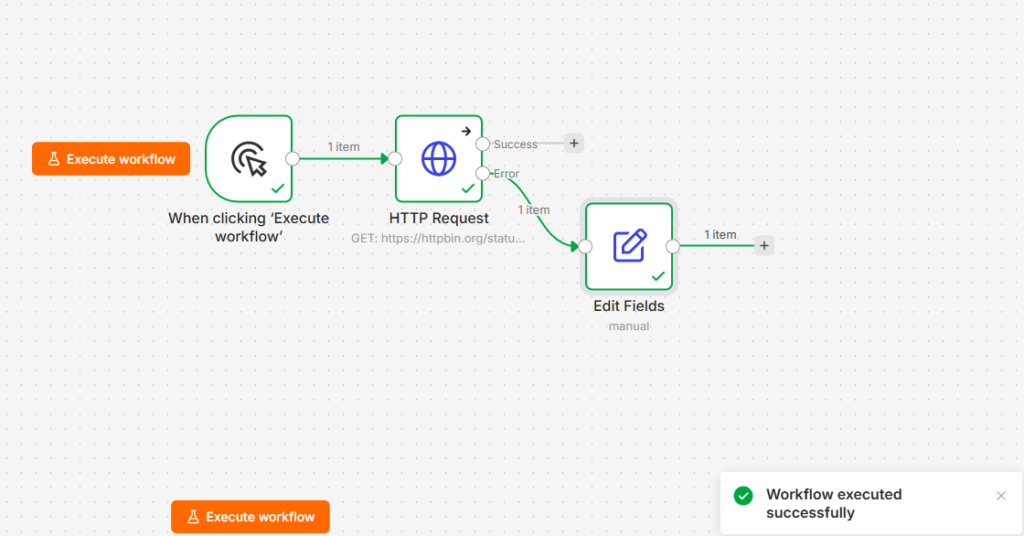
In the node’s Settings tab, set On Error to Continue (using error output). The node grows a second, red output on the canvas. Wire the top output to your happy path and the red one to whatever should happen on failure, like a Slack message or a fallback value.
My favorite screenshot from this build: the API returned a 503, the error branch fired, and n8n’s toast still said “Workflow executed successfully.” That’s the pattern working as designed. The failure was handled, so the execution is green.
3. Global error workflow: one alert for everything
Adding error branches to fifty workflows doesn’t scale. A global error workflow catches failures from all of them.
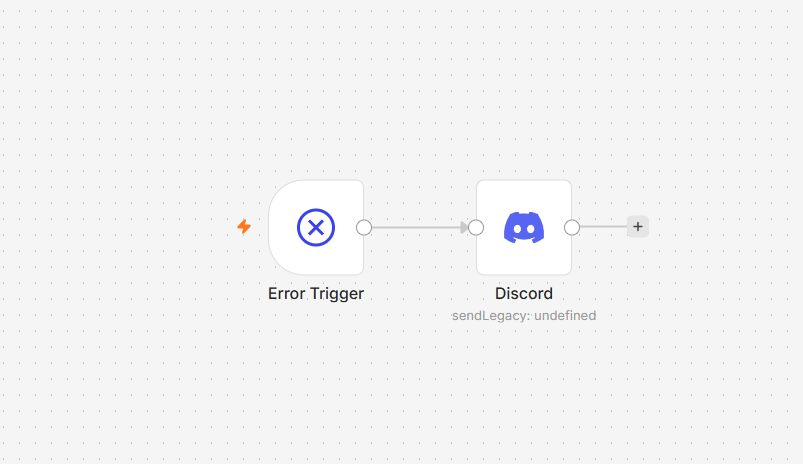
Create a new workflow starting with the Error Trigger node, then add whatever alert you like. Mine posts to a Discord webhook with three expressions: {{$json.workflow.name}}, {{$json.execution.error.message}}, and {{$json.execution.url}}, so the alert tells me what broke, why, and links straight to the failed execution. Then, in every workflow you want covered, open Settings and pick this workflow as the Error Workflow.
The gotcha that cost me twenty confused minutes: error workflows only fire on production executions, not manual test runs. I verified this by building a webhook workflow that deliberately throws, hitting its production URL, and watching the Discord alert land within seconds. Manual runs? Silence, every time.
This handler earned its keep on day one. It caught a real 404 in my release watcher during Anthropic’s overnight rollback of a Claude Code version — that story is its own post

4. Error classification: route by status code
Not all failures deserve the same response. A 429 wants patience, a 401 wants a human, a 500 wants a retry later.
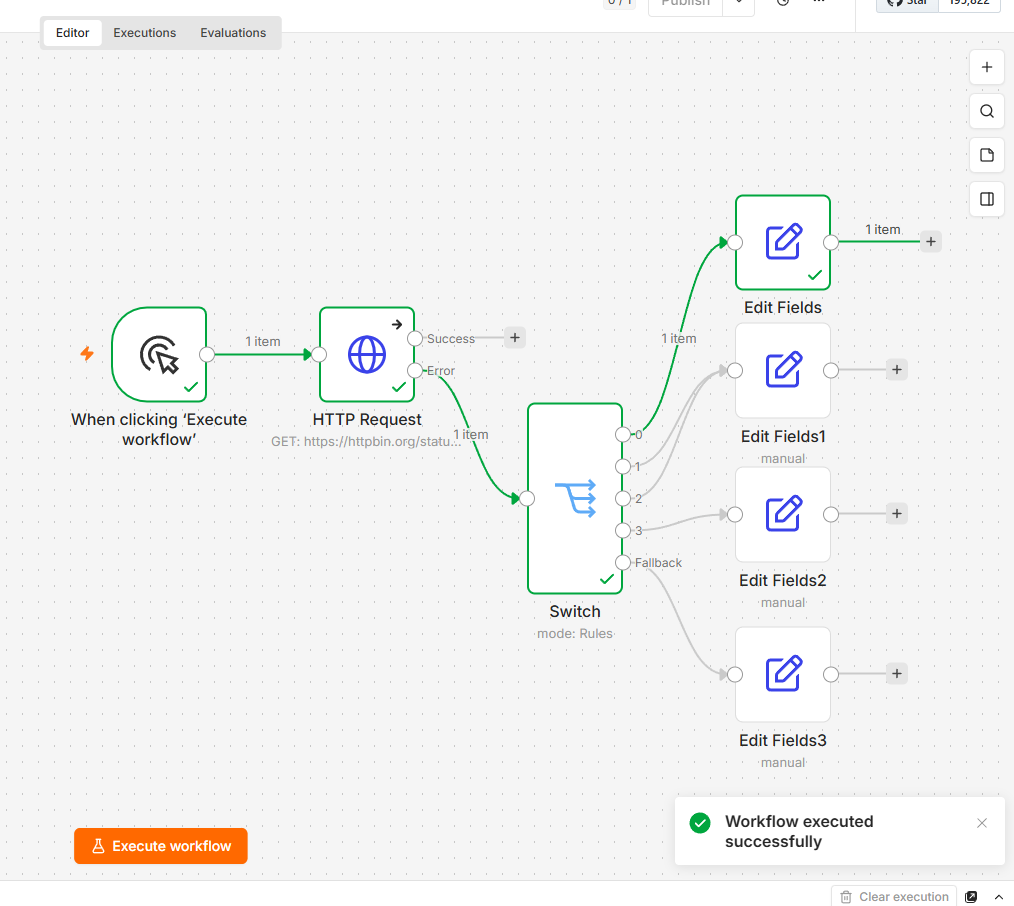
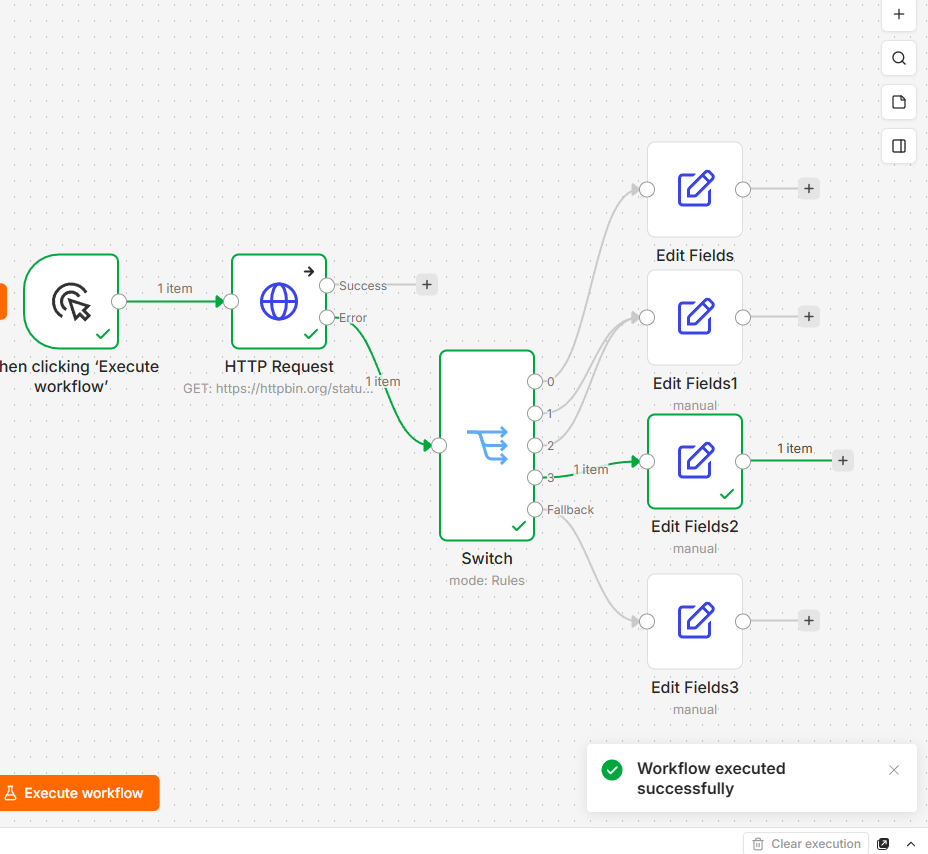
Take the error output from pattern 2 and feed it into a Switch node routing on {{ $json.error.status }}. I verified the field name in n8n 2.29’s error JSON: it’s error.status, and it’s a number. My four routes:
- 429 → Wait, then retry
- 401 or 403 → alert a human (I merged both rules into one Set node)
- >= 500 → park it for a later retry
- Fallback → log and skip
Enable Convert types where required on the Switch, since expression comparisons get picky otherwise. I tested it live against forced failures: a 429 routed cleanly to output 0 and a 500 to output 3.
5. Exponential backoff: a loop on the canvas
Built-in retry waits a fixed interval. Rate-limited APIs want increasing waits, and you can build that with three nodes and zero stored state.
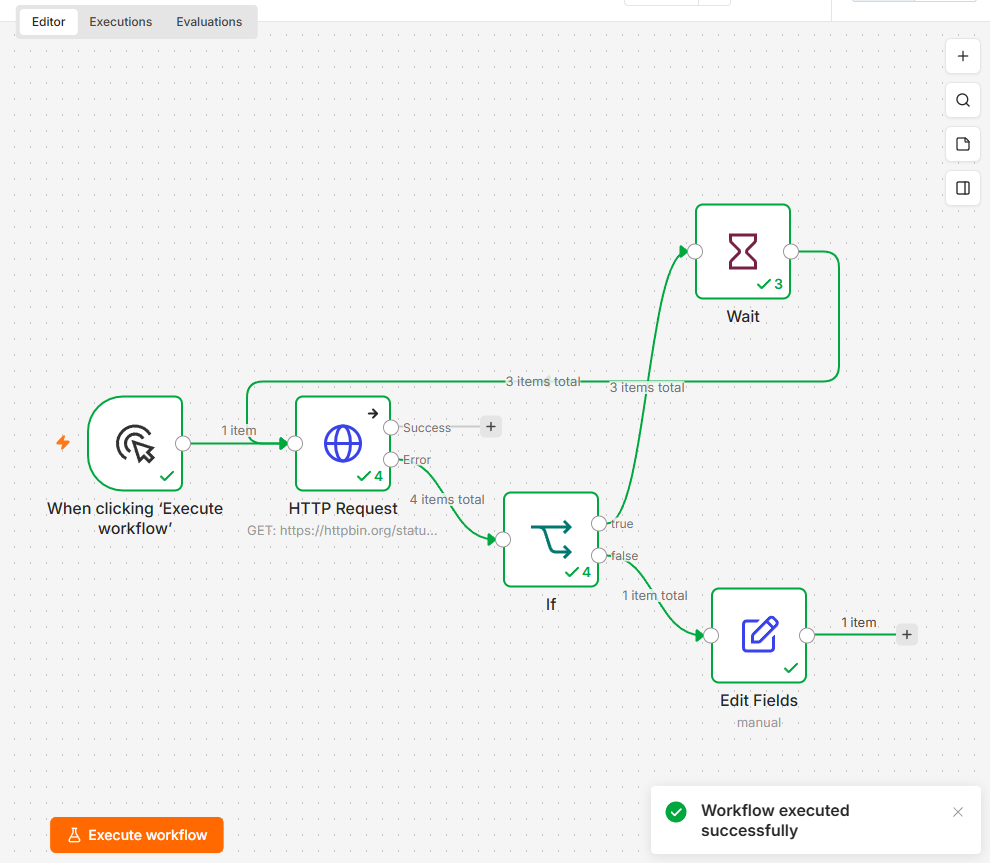
After the HTTP node’s error output, add an IF node checking {{ $runIndex }} < 3. On true, a Wait node with {{ 2 * 2 ** $runIndex }} seconds. Then the trick: wire the Wait node’s output back into the HTTP node, so you get a visible loop on the canvas. $runIndex counts how many times the node has run in this execution, which makes it a free loop counter.
Watching it run was genuinely satisfying: 2 seconds, then 4, then 8, then the IF went false and it exited to my “gave up” branch. The HTTP node showed a checkmark with 4 runs, the Wait node 3.
6. Idempotency: never process the same thing twice
If a workflow reruns after a partial failure, you don’t want duplicate orders or double emails. The fix is checking whether you’ve seen an item before doing anything with it.
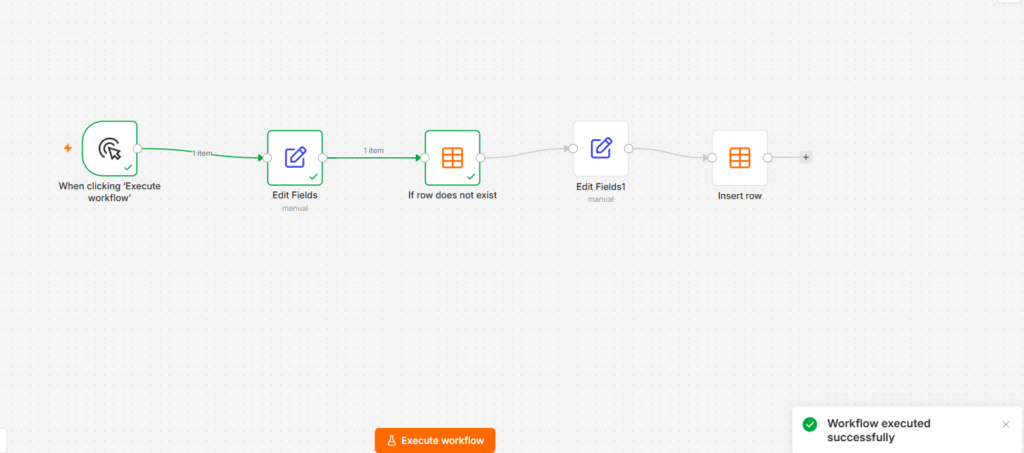
My chain: a Set node stamping an order_id, then a Data Table node with the If row does not exist action on a processed_items table, then the actual work plus an Insert row to record it.
The surprise: in n8n 2.29, “If row does not exist” is a gate, not a router. It has a single output that passes the item through when no matching row exists and outputs nothing when one does. I expected a two-way branch and stared at the canvas for a while. Run the workflow twice and you see it plainly: first run flows to the end, second run stops dead at the gate with 0 items. If you want an explicit “duplicate found” path, use Get row(s) plus an IF node instead.
7. Dead-letter queue: failures you can replay
Alerts tell you something broke. A dead-letter queue keeps the broken thing so you can fix and replay it.
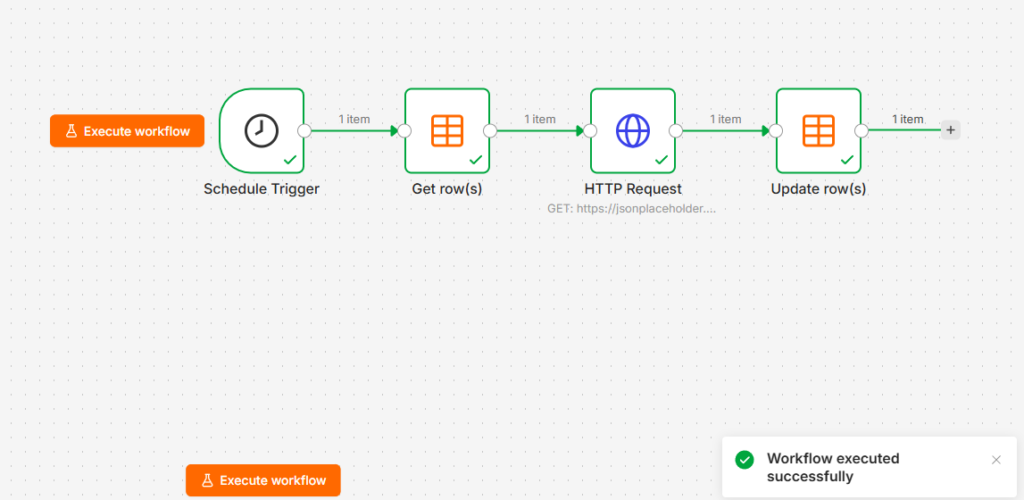
From the error branch: a Set node capturing payload = {{ $json.error.message }} and status = failed, then a Data Table Insert row into a dead_letter table. The companion workflow (the eighth JSON) runs on a Schedule trigger every Sunday, does Get row(s) where status = failed, reprocesses each item, and finishes with Update row(s) setting status = recovered.
One caution from testing: in the Update row(s) node, remove the unused payload mapping. Leave it in and it happily overwrites your stored payload with an empty value, which defeats the entire queue.

FAQ
Do failed executions count against my quota on n8n Cloud?
Yes. Every execution counts, failed or not, and retries happen inside a single execution. That’s one more reason to prefer Retry On Fail and backoff loops over blindly rerunning whole workflows.
My error workflow didn’t fire. Why?
Almost certainly because you tested with a manual run. Error workflows only trigger on production executions (see pattern 3). Activate the workflow, hit its production trigger, and test again.
Should I use Retry On Fail or an error branch first?
Both, in that order. Retries run first and absorb transient failures; the error output only fires after the final retry fails. Retry handles the blip, the branch handles the genuine outage.
Download all 8 workflows
Download all 8 workflows (.zip)
Import via Workflow → Import from File, swap in your own URLs and webhook credentials, and create the two Data Tables (processed_items, dead_letter) before running patterns 6 and 7.
This site isn’t affiliated with n8n GmbH, or any tool covered here. All eight workflows are exports from my own instance.