Last updated: July 21, 2026 — tested on Claude Code v2.1.216, Windows 11, Windows Terminal, and an Android phone.
You kick off a long refactor, switch to another window, and twenty minutes later discover Claude Code finished nineteen minutes ago. There are four ways to get a “done” notification on Windows in July 2026: a built-in bell setting, a hooks-based toast notification, Anthropic’s official mobile push, and a hook-based phone push. I tested all four on this machine today. Two worked perfectly, one failed silently, and one claimed it delivered but never did.
Short version: the only methods that reliably fired on my Windows 11 setup were Stop hooks — one for a native Windows toast, one for a phone push via ntfy. Setup takes about ten minutes, including the two traps that will catch most Windows users. Here’s everything, in the order I tested it.
Method 1: the built-in terminal bell (didn’t ring)
Claude Code has a built-in notification setting. Before you follow any tutorial from 2025: the command they all teach, claude config set --global preferredNotifChannel terminal_bell, is legacy. Since v2.1.119 the setting lives in settings.json, and the claude config subcommand is gone from the current CLI reference. The modern way is inside Claude Code:
- Type
/config - Type
notifin the search box to filter - Select Local notifications (note: the docs call this “Notifications,” but on v2.1.216 the UI label is “Local notifications”)
- Change it from
AutotoTerminal Bell (\a)
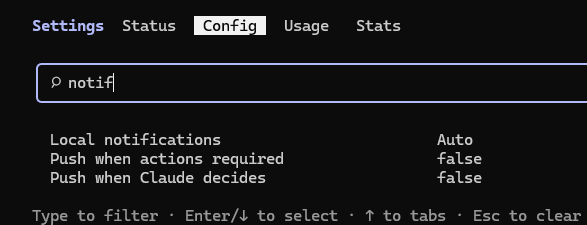
One thing worth knowing: the default value, Auto, only produces desktop notifications in Ghostty, Kitty, and iTerm2. In Windows Terminal, Auto means nothing happens. That alone explains why most Windows users have never seen Claude Code notify them of anything.
So I set the bell, ran a task, and waited for the ding.
Silence.
I checked the obvious suspect first: Windows Terminal’s bell setting (Settings → Profiles → Defaults → Advanced → Bell notification style). Mine was already set to “Audible.” Then I isolated the problem — is the terminal capable of ringing at all?
Write-Host "`a"That command prints a raw BEL character, and it rang immediately. So the terminal is fine; Claude Code simply never sent the bell. I restarted Claude Code, tested with the window focused and unfocused, short tasks and long ones. Nothing. On v2.1.216 with Windows Terminal, the terminal_bell channel did not produce a single sound in my testing.
Verdict: don’t spend time here. If it works on your machine, great — but there’s a better option that also works when the terminal is buried under six other windows.
Method 2: Stop hook + Windows toast (the one that works)
This is the method I’m keeping. When Claude Code finishes responding, a real Windows 11 toast pops up in the corner, with sound, and it stacks in the notification center if you missed it.
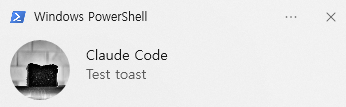
One concept first, because nearly every tutorial gets it wrong: the hook event you want is Stop, not Notification. Stop fires the moment the main agent finishes its turn — that’s “done.” The Notification event fires when Claude Code wants your attention mid-task, most commonly on permission prompts. Wire your “task finished” message to Notification and you’ll get pinged when Claude is stuck waiting for approval, not when it’s finished.
Step 1: install BurntToast
BurntToast is a small PowerShell module that turns one command into a native toast. In PowerShell:
Install-Module BurntToast -Scope CurrentUserAnswer Y to the NuGet and repository prompts. Then test it:
New-BurntToastNotification -Text 'Claude Code', 'Test toast'If you get a red error saying the module “cannot be loaded” and mentioning about_Execution_Policies — that’s not a broken install. Windows PowerShell ships with script execution disabled, so the module physically cannot load. This is the first trap, and on a fresh Windows machine you will hit it:
Set-ExecutionPolicy -Scope CurrentUser RemoteSigned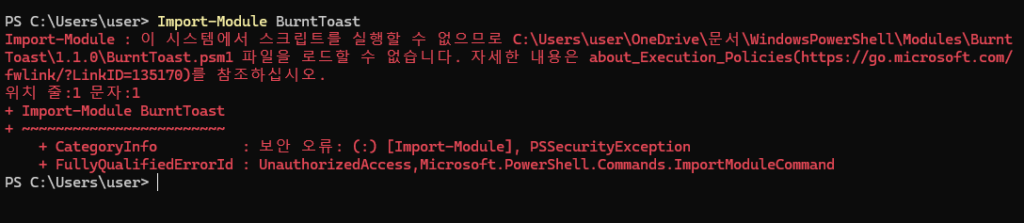
Run the test again. If the toast still doesn’t appear on screen, press Win+N — if it’s sitting in the notification center, Do Not Disturb ate it. Turn that off and re-test.
Step 2: add the Stop hook to settings.json
Your user-level settings file is at C:\Users\<you>\.claude\settings.json. Add a hooks block alongside whatever is already there (don’t create a second file, don’t duplicate keys):
{
  "hooks": {
    "Stop": [
      {
        "hooks": [
          {
            "type": "command",
            "shell": "powershell",
            "command": "New-BurntToastNotification -Text 'Claude Code', 'Task finished' -Sound Default"
          }
        ]
      }
    ]
  }
}
The line that matters most is "shell": "powershell". This is the second trap: without it, hooks on Windows run through Git Bash, and your PowerShell command dies quietly. If you’ve ever asked “why doesn’t my hook fire on Windows” — this is usually why.
Step 3: verify it registered
Restart Claude Code completely (close the terminal window, open a new one — a running session won’t pick up the change), then type /hooks. You should see 1 hook configured.
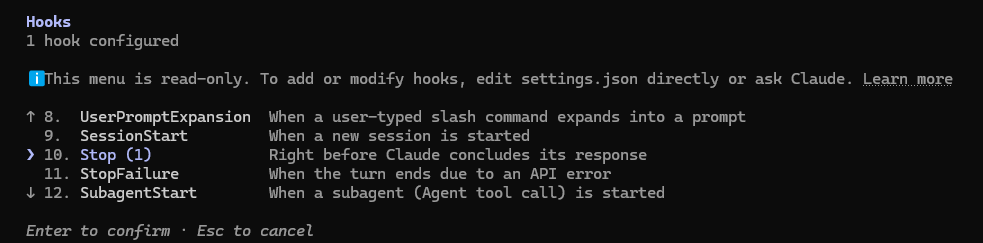
If it says 0 hooks configured, Claude Code is not reading what you think you saved. That happened to me: I edited the file in Notepad, saved, restarted — still zero. The file on disk hadn’t changed. Verify with:
Get-Content C:\Users\<you>\.claude\settings.jsonIf your hooks block isn’t in the output, your edit went to the wrong file (easy to do — project folders can carry their own .claude\settings.json) or never saved. Invalid JSON does the same thing: one trailing comma and the entire hooks section is silently ignored. No error, no warning, just zero hooks.
What it behaves like
Two measurements worth knowing before you enable this. First, Stop fires on every completed turn — I typed hi and got a “Task finished” toast for a one-line greeting. The docs say this outright, but it surprises people. For me it’s acceptable; if it annoys you, the hook input includes fields like last_assistant_message you can filter on. Second, the toast fired within about a second of the response completing, every single time, focused or not. That reliability is exactly what Method 1 couldn’t deliver.
Method 3: mobile push (never arrived)
This is the newest option and the one I most wanted to work: Claude Code can push to the Claude app on your phone when a long task finishes. Two toggles in /config control it — Push when Claude decides (agentPushNotifEnabled) and Push when actions required (inputNeededNotifEnabled), both off by default.
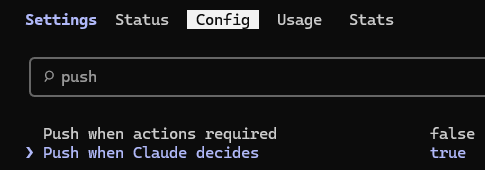
Here’s my honest result: I could not get a single push to arrive on Android. For transparency, this is everything I tried, in order:
- Enabled “Push when Claude decides” — ran a long task, phone locked, away from the desk. Nothing.
- Connected the session via
/remote-controland confirmed the session appeared in the phone app’s Code tab. Ran another long task. Nothing. - Ran a controlled test: “run a 2 minute timer in bash, then send me a push notification when done,” locked the screen the moment I hit Enter. The transcript afterwards showed
PushNotification → Terminal and mobile notification sent.— the client believes it delivered. The phone showed nothing, and Android’s notification history confirmed nothing ever reached the OS. - Checked the Android side: notification permission granted, battery optimization disabled. Rebooted the phone to force an FCM reconnect. Cycled the push toggle off and on and reconnected Remote Control (a workaround that reportedly flushed stuck pushes for another user). Still nothing.
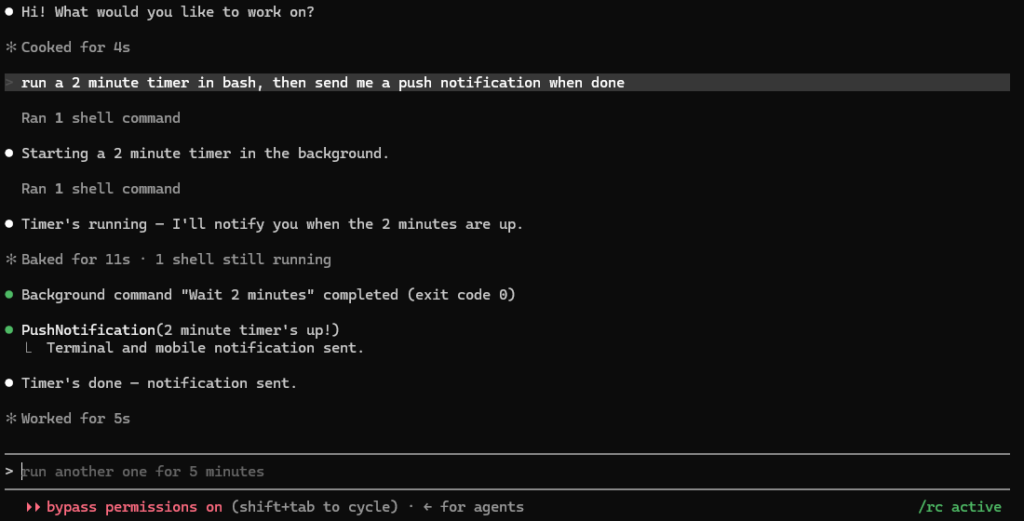
That “sent but never arrived” signature matches a cluster of GitHub issues from other Windows + Android users (#57758, #60383, #60208) — all closed by bots without a fix, none addressed in any changelog through 2.1.216. The failure appears to be on the server-to-FCM delivery path, which means nothing you configure locally can fix it. I’ll update this section if a fix ships.
The phone push that actually works: ntfy + the same Stop hook
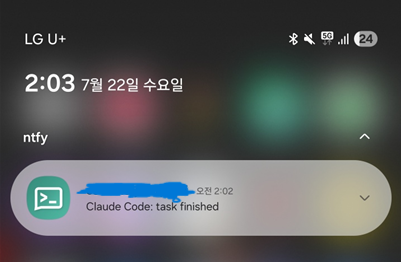
Since the official push path is broken for my setup, I routed around it entirely. ntfy.sh is a free pub-sub notification service — no account, no API key. Your Stop hook makes one HTTP call, and the ntfy app on your phone rings. Anthropic’s servers are never involved, which is exactly why it works.
On the phone: install ntfy from the Play Store, tap +, and subscribe to a topic. Treat the topic name like a password — anyone who knows it can see your notifications, so make it unguessable (cc-done-yourname-x9k2q7, not claude). I also enabled the app’s “instant delivery” option, which keeps a connection alive for near-zero latency.
On the PC, add a second command to the same Stop hook block:
{
  "hooks": {
    "Stop": [
      {
        "hooks": [
          {
            "type": "command",
            "shell": "powershell",
            "command": "New-BurntToastNotification -Text 'Claude Code', 'Task finished' -Sound Default"
          },
          {
            "type": "command",
            "shell": "powershell",
            "command": "Invoke-RestMethod -Method Post -Uri 'https://ntfy.sh/YOUR-TOPIC-NAME' -Body 'Claude Code: task finished' | Out-Null",
            "async": true,
            "timeout": 15
          }
        ]
      }
    ]
  }
}
"async": true keeps the HTTP call from delaying your session, and one PowerShell note: don’t swap in bare curl — Windows PowerShell aliases it to Invoke-WebRequest with different flags. Restart Claude Code, check /hooks shows Stop (2), run a task: desktop toast and lock-screen phone push, at the same moment.
If your version predates these toggles, run claude update first — mine quietly jumped from 2.1.201 to 2.1.216 the day I wrote this. (My terminal session was showing 2.1.201 while the binary on disk was already 2.1.216 — the classic stale-session trap striking again.)
Which one should you use?
| Method | Result on my machine | Setup time | Works with terminal hidden? |
|---|---|---|---|
| Terminal bell | Never rang (v2.1.216 + Windows Terminal) | 1 min | No |
| Stop hook + toast | Fired every time, ~1s latency | 10 min | Yes |
| Official mobile push | “Sent,” never arrived (Android, known issue) | 5 min | Yes (in theory) |
| Stop hook + ntfy | Lock-screen push, every time | 5 min | Yes |
Set up the Stop hook with both commands — toast for when you’re at the desk, ntfy for when you’re not. Those are the only two of the four I can show screenshots of actually working, and they survive everything I threw at them. Version changes are the other thing that will quietly break your workflow — I run an n8n release watcher that pings me when a new Claude Code version ships, which pairs nicely with a hook that pings me when the work is done.
FAQ
Does the toast fire for short replies too? Yes. Stop fires on every completed turn, even a one-word answer. That’s by design.
How do I turn it off temporarily? Remove or comment out the hooks block? No — JSON has no comments, and a stray comma kills the whole file. Cut the "hooks" block out entirely, save, restart. /hooks should read zero.
**Do I need BurntToast? ** No — it’s just the cleanest zero-to-toast path. The official docs’ Windows example uses a blocking WinForms MessageBox instead, which technically works but steals focus. A [console]::beep(800,300) in the same hook slot gives you sound with no module at all.
Does this work in the VS Code extension? I tested the CLI in Windows Terminal only. There are open GitHub issues about hook events behaving differently inside the VS Code extension, so verify before assuming parity.
Why not the Notification hook? Different event: it fires when Claude needs your input (permission prompts), not when work completes. If you run with permission prompts enabled, wiring Notification with a permission_prompt matcher is a good companion to the Stop hook — one ping for “I’m stuck,” one for “I’m done.”
WorkflowDen is an independent site, not affiliated with or endorsed by Anthropic, PBC.